
Registering a new domain name is an exciting first step for all of us Aussies, but what comes next is just as important. Proper management of a domain name ensures your website and emails run correctly and your personal information stays secure. This post is dedicated to showing you all about domains at Crazy Domains, from essential security features to pointing your domain to another web hosting provider. We will cover Domain Guard, privacy, forwarding with DNS settings. Think of this as the perfect companion to our Crazy Domains related video tutorials.
Watching someone go through the process can make it much clearer. Our video tutorial walks you through the exact steps of accessing your DNS settings, and what domain guard is about with Crazy Domains. It’s the best way to see these insights in action.
Video Tutorial: Crazy Domains: Domain Privacy, Expiry Protection & Domain Guard Explained
Your Domain Management Hub
Once you log into your Crazy Domains account, the domain management area is your mission control. It’s the central place where you handle everything for your registered Top-Level Domains (TLDs), whether it’s a popular .com, an Australian .com.au, or any other extension. Don’t be intimidated by all the options; they are designed to give you complete control over your online identity. We’ll break down the most important ones.
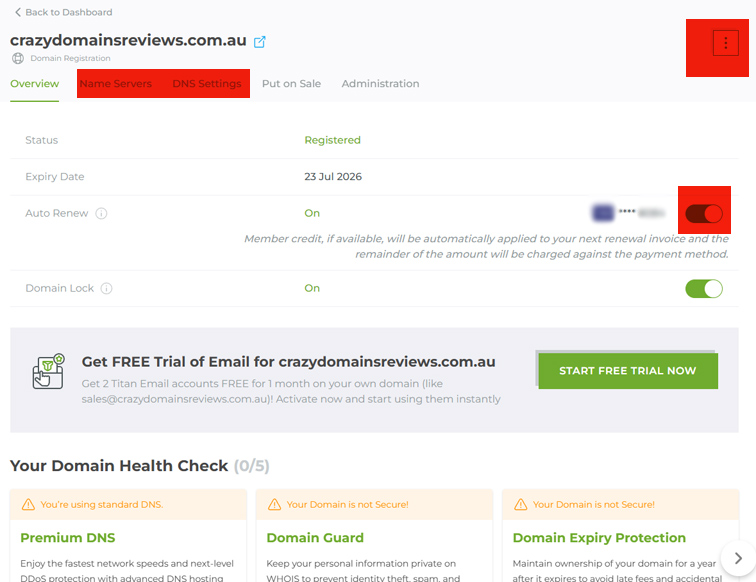
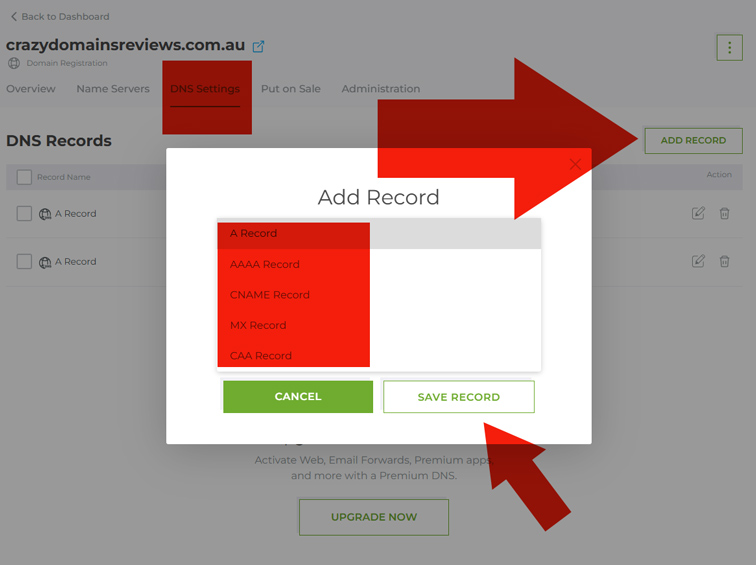
Mastering Your DNS Settings
IMPORTANT: the only time you would want to change your DNS Settings is when you want to point your domain registered with Crazy Domains to another web hosting provider. If you’ve registered your domain and got web hosting with Crazy Domains DNS is setup automatically so you need not modify it.
DNS, or Domain Name System, is like the internet’s address book. It translates your human-friendly domain name (like mywebsite.com.au) into a computer-friendly IP address. Managing your DNS settings is a fundamental skill for any website owner. This is where you’ll point your domain to third-party services like GoDaddy Hosting or Google Workspace for emails. The main records you’ll interact with are A, CNAME, and MX records, all of which are easily accessible in the Crazy Domains panel.
Protecting Your Details with Domain Guard and Privacy
Security and privacy are not features you should ignore. Crazy Domains offers two key services to protect your domain and your personal information.
- Domain Privacy This service hides your personal details like your name, address, and phone number from the public WHOIS database. This prevents spammers and marketers from getting your information.
- Domain Guard This adds another layer of security to prevent unauthorized transfers or “domain hijacking”. It locks your domain at the registry level, requiring extra verification for any critical changes.
Domain Expiry Protection
When you register your domain with Crazy Domains, you can set it to Auto Renew, then, you do not really need Domain Expiry Protection. You can remove Domain Expiry Protection from your Cart at checkout process and save $$. What is it? Crazy Domains protects a domain name from expiring just in case you do not set it to auto renew.
Domain Certification
A Certified Domain means that your Domain’s Registration, including your credentials as an owner, has been officially certified and verified by Crazy Domains. Basically, they will create a PDF document that certifies the domain registrant if you purchase this addon. During my 10+ years working as a qualified web developer and Google specialist, I hardly needed this for myself or for my valued clients.
Your Domain Management Checklist
Managing your domain doesn’t have to be complicated. By understanding these core functions within your Crazy Domains account, you can ensure your website is running smoothly and your assets are protected. Taking a few minutes to configure DNS, set up privacy, and learn about forwarding will save you a lot of time down the road.
Frequently Asked Questions
What is a TLD?
TLD stands for Top-Level Domain. It's the part of the domain name that comes after the dot. Common examples include .com, .org, .net, and country-specific TLDs like .com.au for Australia or .co.nz for New Zealand.
How long does it take for DNS changes to take effect?
Changes to DNS records are not instant. The process, known as propagation, can take anywhere from a few minutes to 48 hours to be fully active across the entire internet. However, it often completes within 2 to 4 hours.
You can speed up this process by using Microsoft Windows Command Prompt. Simply use: ping example.com.au
Do I really need Domain Privacy?
It is highly recommended. Without Domain Privacy, anyone can look up your .com domain in the WHOIS database and see the personal name, address, email, and phone number you used to register it. This can lead to a significant increase in spam calls and emails. It's a small price for protecting your personal information.
Can I forward my domain name to my Facebook or LinkedIn page?
Yes, absolutely. Domain forwarding is perfect for this. You can register a professional domain name and have it redirect visitors directly to your social media profile, which is a great strategy if you don't have a full website yet.
Note: you can host a domain on external web hosting company. However, you may need Premium DNS activated for domain forwarding to some external URLs.