

G’day! As a digital creator and a website manager here in Australia, one of the most fundamental tasks I perform is pointing a domain name to a web hosting server. This is done using DNS records, specifically the ‘A’ and ‘AAAA’ records. If your web host has given you an IP address and you’re not sure what to do next, you’re in the right place. This guide will show you exactly how-to add A & AAAA records in Crazy Domains, and I’ll make it super simple to understand.
Prefer to Watch the Video Instead?
If you’d rather see me do this live on screen, you can watch my complete walkthrough on the RankYa YouTube channel. It’s often easier to follow along with a video, so just press play below.
What Are A and AAAA Records Anyway?
Before we start, let’s quickly break down what these records are in plain English. Think of your domain name (like `yourbusiness.com.au`) as a contact name in your phone. The IP address is then the actual phone number. The DNS ‘A Record’ is what connects the name to the number.
- An A Record connects your domain to a standard IP address (called IPv4, e.g., `192.168.1.1`). This is the most common one you will use.
- An AAAA Record does the exact same thing but for the newer generation of IP addresses (called IPv6). As we move through 2025, these are becoming more common.
Your web host will provide you with the correct IP address or addresses to use.
Step-by-Step: Adding Your A Record in Crazy Domains
Ready to point your domain? It only takes a few minutes. Let’s get started.
Step 1 Get Your IP Address from Your Web Host
Before you log in to Crazy Domains, you need the IP address of your hosting server. Your web hosting provider will have given this to you in your welcome email or it will be visible in your hosting control panel. Copy it to your clipboard.
Step 2 Log in and Go to DNS Settings
Log in to your Crazy Domains account. Find the domain name you want to manage and click on it. Look for the “DNS Settings” option to open the editor where all your records are listed.
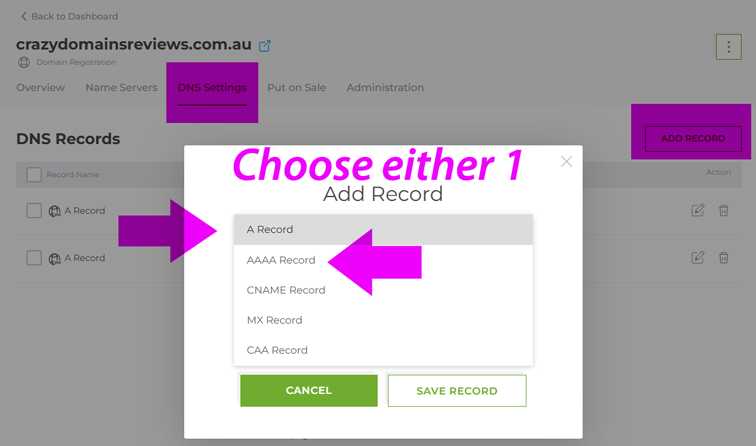
Step 3 Add the New A or AAAA Record
You will need to either edit an existing A record or add a new one. Click “Add Record” and select ‘A’ or ‘AAAA’ from the type list. You will see a few fields:
- Subdomain For your main website, leave empty.
- Value (or Points To) This is where you paste the IP address you copied from your web host.
You can add another A Record, but this time cover redirection for ‘www’ as that is considered a subdomain.
- Subdomain enter ‘www’
- Value (or Points To) This is where you paste the IP address you copied from your web host.
Double-check that the IP address is correct and then click the “Save” or “Update” button.
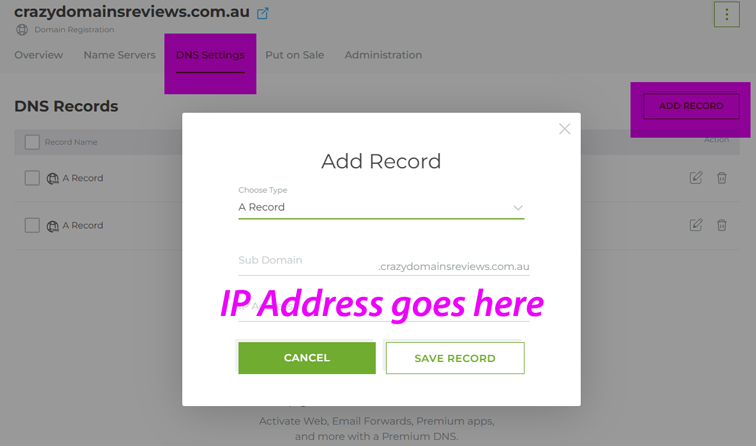
Step 4 Save and Wait for Propagation
You’ve now done your part. The changes need to spread across the internet in a process called propagation. This can take anywhere from 30 minutes to a few hours. Once it’s complete, your domain name will be pointing to your new web host.
How-to Speed-Up DNS Propagation
Open Windows Command Prompt (Search Windows Search Box with CMD) and run any one or all these commands:
- nslookup yourdomain.com.au
- ping yourdomain.com.au
- tracert yourdomain.com.au
Frequently Asked Questions
What's the difference between an A Record and a CNAME Record?
An A Record points a domain name to a specific IP address (a number). A CNAME Record points a domain name to another domain name (an alias). You use an A Record for your primary hosting, while a CNAME is for connecting to third-party services.
How do I find my website's IP address?
Your web hosting provider supplies your website's IP address. It is almost always included in the welcome email they send when you first sign up for a hosting plan, and it can also be found within your hosting account's control panel (like cPanel or Plesk).
Can I have more than one A record?
While it is technically possible for advanced setups like load balancing, for most small business websites, you will only have one A record for your root domain (@) and one for your 'www' subdomain pointing to the same IP address.
Do I need both an A and an AAAA record?
You only need to add the records that your web host provides. Most hosts will give you an A record (IPv4) as a minimum. If they also provide an AAAA record (IPv6), it is good practice to add that as well to support newer networks.
How long does it take for the A record to update?
After you save the changes in Crazy Domains, it typically takes between 30 minutes and 4 hours for the new record to propagate across the internet. In some rare cases, it can take up to 24 hours to be visible everywhere.