

Welcome! In this tutorial, I’ll show you a simple process for when buying or renewing your Crazy Domains products. As someone who has used their services for over a decade for my own projects and for my clients here in Australia and overseas, I’ve gone through this process countless times. Whether you prefer to read and follow along with pictures or watch a video, this post has you covered. Let’s make managing your online assets simple and stress-free.
Prefer to Watch a Video?
In this below video, I show you my screen and guide you through every click of the buying and renewal process at Crazy Domains. You can pause, rewind, and follow at your own pace.
How to Buy New Products from Crazy Domains
Purchasing a new domain name, web hosting, or any other service from Crazy Domains is a straightforward process. You just need to know where to look. Below are the typical steps you would take to secure a new product for your business website.
Step-by-Step Purchasing Guide
- Visit the CrazyDomains.com.au website
- Use their search bar to find your desired domain name or navigate to the web hosting section
- Add the product you want to your shopping cart
- Review your cart carefully, and proceed to the checkout page
- When on the checkout page, double check that you are buying
- Create a new account or log in to your existing one
- Complete the payment process using your preferred method
Once your payment is confirmed, your new product will be available in your account manager area. From there, you can manage its settings and connect it to your website.
IMPORTANT NOTES: just like many other web hosting service providers, Crazy Domains will try to upsell you add-on products. Some you may need, but when unsure, you can confidently remove them from your Cart before you finalize your payment.
IMPORTANT NOTES: depending on the product you are purchasing, you may actually require other products for it to work. For example: Titan Email will require a domain name, so make sure to understand the Terms of Service before you buy your product. Or simply talk to their customer support team.
How-to Renew Existing Products at Crazy Domains
Keeping your services active is critical for your website to stay online. Renewing your products before they expire is essential. The process is even simpler than buying new ones because all your services are kept neatly in one place.
Finding and Renewing Your Services
To renew your products, you first need to access your account. Here’s how you can do it.
- Log in to your Crazy Domains account
- Navigate to the ‘My Account’ or account manager dashboard
- You should see a list of your products or a menu option for ‘Renew’
- Select the products you wish to renew by ticking the checkbox next to them
- Choose your desired renewal period (e.g., 1 year, 2 years)
- Proceed to checkout and complete the payment
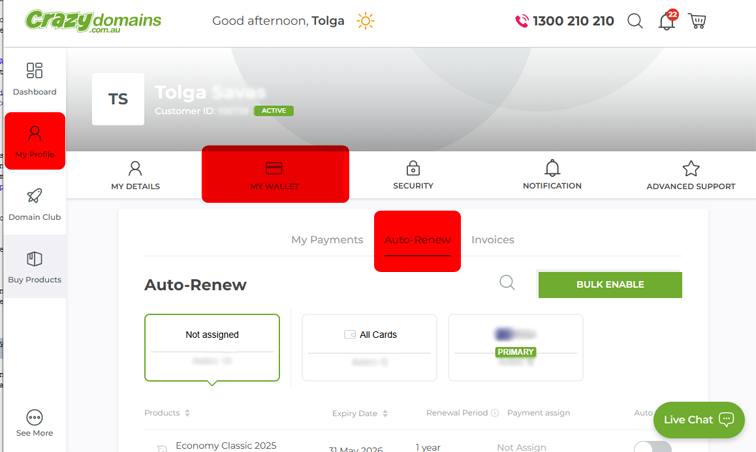
Although they send out early notices for expiring products, I always ensure that critical products or services are set to auto-renew just in case. However, I work online, so if I no longer need the product it will be auto-renewed so keep that in mind.
Why I Recommend Crazy Domains
I’ve built my career on providing genuine, expert advice. I use many web hosting service providers but for myself I stick with Crazy Domains for my own business and recommend them because they offer affordable and reliable options for Australian business owners. Their platform makes it easy to get started online, which is a mission I fully support.
Frequently Asked Questions
Can I turn on auto-renewal for my Crazy Domains products?
Yes, Crazy Domains offers an auto-renewal feature. You can enable it from your account manager for each product. This helps ensure your services never expire accidentally, as long as your payment method is up to date.
What happens if I forget to renew my domain name?
If you do not renew your domain name before it expires, it will enter a grace period. During this time, your website and emails associated with the domain will stop working. After the grace period, the domain may enter a redemption period, where renewing it becomes more expensive, before eventually being released to the public. Crazy Domains offers Domain Expiry Protection as an add-on service to protect against losing your domain due to forgetting to renew it.
How long does it take for a new purchase to become active?
Most products, like domain names and web hosting, are activated almost instantly after your payment is successfully processed. You should be able to see and manage them in your account within a few minutes.
Can I renew multiple products at the same time?
Absolutely. The Crazy Domains account manager allows you to select multiple products from your list and add them all to the cart for a single checkout. This is very convenient for renewing your domain, hosting, and email at once. Always double check what you are renewing before you finalise your payment.
Where can I find my invoices for purchases and renewals?
They will email you receipt. But you can access all your past invoices and payment history within your Crazy Domains account. Look for a menu option My Profile > My Wallet > Invoices in your account dashboard. You can view, download, and print them for your records.